作者knives ()
看板Web_Design
標題[問題] 英文按鈕的排列在各種Browser不一樣
時間Wed Jun 23 09:24:13 2010
請先看這張圖
http://i642.photobucket.com/albums/uu144/aloha1003/Untitled.png
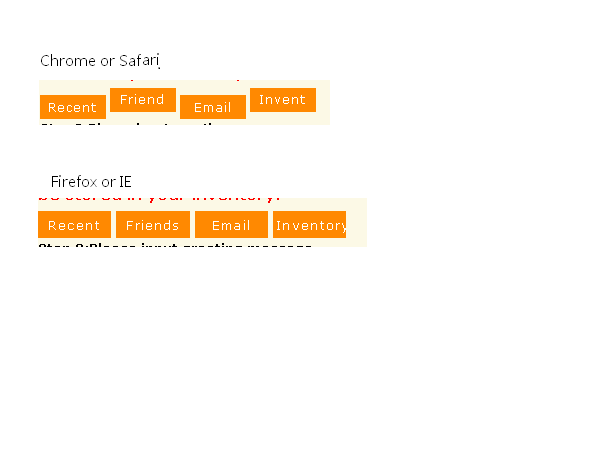
上面的是用Chrome或是Safari看到的
下面的則是Firefox、IE
很明顯的下面的按鈕排列方式是很整齊,而上面的按鈕則是忽高忽低
我裡面的html只有這樣
<input type="button" style="width: 66px; " class="submit"
onclick="show_div('visitor');" value="Recent">
<input type="button" style="width: 66px; " class="submit"
onclick="show_div('friend');" value="Friends">
<input type="button" style="width: 66px; " class="submit"
onclick="show_div('email');" value="Email">
<input type="button" style="width: 66px; " class="submit"
onclick="show_div('me');" value="Inventory
">
套用到的css只有
.submit {
-moz-background-clip:border;
-moz-background-inline-policy:continuous;
-moz-background-origin:padding;
background:#FF8901 none repeat scroll 0 0;
border:medium none;
color:#FFFFFF;
cursor:pointer;
height:24px;
letter-spacing:1px;
line-height:20px;
padding:0 5px;
}
body, th, td, input, select, textarea, button {
-x-system-font:none;
font-family:Verdana,"Lucida Grande",Arial,Helvetica,sans-serif;
font-size:12px;
font-size-adjust:none;
font-stretch:normal;
font-style:normal;
font-variant:normal;
font-weight:normal;
line-height:1.5em;
word-wrap:break-word;
}
可是有趣的一點是,當我把按鈕裡面的文字全部改成中文字的時候
Chrome、Safari看的到排列方式就是整齊畫一
請問這個該怎麼解決,才能讓chrome、safari的排列也是正常的
謝謝回答
--
※ 發信站: 批踢踢實業坊(ptt.cc)
◆ From: 122.117.39.194
→ dlikeayu:你按鈕的樣式 不如直接用li a元素來做 可能還正常點 06/23 12:50
推 evenwu:行內元素的問題 06/23 14:33
→ knives:那要怎麼改 06/23 15:35
推 magazine2006:刪除word-wrap:break-word; 就正常了 06/24 01:05
→ knives:刪掉還是一樣 07/01 15:32