作者rick (物以類聚人以群分)
看板Browsers
標題[-Fx-] Firefox 152.0.6 release
時間Wed Jun 17 00:41:59 2026
官方版本153.0預計在 2026年07月21日(美國時間) 台灣時間07月21日~07月22日 更新
152.0.6 Release Note
https://www.mozilla.org/en-US/firefox/152.0.6/releasenotes/
New︰
Smart Window includes several enhancements:
https://www.firefox.com/smart-window
。Select text on a page and get quick access to summarize, explain, and
more using the built-in assistant. (Bug 2034921)
https://bugzilla.mozilla.org/show_bug.cgi?id=2034921
。Added a row of shortcuts to New Tab, making it easier to get back to
sites. (Bug 2048338)
https://bugzilla.mozilla.org/show_bug.cgi?id=2048338
Fixed︰
Fixed an issue that prevented email tracking protection from being disabled
in the redesigned Firefox Settings. (Bug 2049331)
https://bugzilla.mozilla.org/show_bug.cgi?id=2049331
Fixed a hang that could occur after using a file picker dialog on macOS 26.
(Bug 2053177)
https://bugzilla.mozilla.org/show_bug.cgi?id=2053177
Fixed the homepage not loading for some enterprise configurations that set
it using a legacy autoconfig format. (Bug 2047962)
https://bugzilla.mozilla.org/show_bug.cgi?id=2047962
Various security fixes.
https://www.mozilla.org/security/advisories/mfsa2026-67
152.0.5 Release Note
https://www.mozilla.org/en-US/firefox/152.0.5/releasenotes/
Fixed︰
Fixed the Manage payment methods list in Settings appearing empty when a
saved payment card had no expiration date. (Bug 2048383)
https://bugzilla.mozilla.org/show_bug.cgi?id=2048383
152.0.4 Release Note
https://www.mozilla.org/en-US/firefox/152.0.4/releasenotes/
New︰
Smart Window includes several enhancements:
https://www.firefox.com/smart-window
。You can now ask it to close your tabs, with a confirmation step when
needed and the option to undo afterward. (Bug 2040769)
https://bugzilla.mozilla.org/show_bug.cgi?id=2040769
。Browsing history results now appear with images. (Bug 2038069)
https://bugzilla.mozilla.org/show_bug.cgi?id=2038069
。When you give feedback on a response, you can now choose from common
reasons and preview exactly what will be shared before submitting. (Bug
2033002)
https://bugzilla.mozilla.org/show_bug.cgi?id=2033002
Fixed︰
Fixed copy, paste, undo, redo, and similar keyboard shortcuts not working
inside macOS system dialogs such as the Save and Open panels. (Bug 2040851,
Bug 2040844)
https://bugzilla.mozilla.org/show_bug.cgi?id=2040851
https://bugzilla.mozilla.org/show_bug.cgi?id=2040844
Fixed the Manage Cookies and Site Data dialog opening with an empty list
when opened from the Settings search results. (Bug 2041077)
https://bugzilla.mozilla.org/show_bug.cgi?id=2041077
Fixed keyboard focus landing in the wrong place after following an in-page
link, so pressing Tab continues from the link's position as expected. (Bug
2049307)
https://bugzilla.mozilla.org/show_bug.cgi?id=2049307
Various security fixes.
https://www.mozilla.org/security/advisories/mfsa2026-62
152.0.3 Release Note
https://www.mozilla.org/en-US/firefox/152.0.3/releasenotes/
Fixed︰
Fixed an issue that could cause extreme memory usage and freezing on
startup for users with language packs installed. (Bug 2049845)
https://bugzilla.mozilla.org/show_bug.cgi?id=2049845
152.0.2 Release Note
https://www.mozilla.org/en-US/firefox/152.0.2/releasenotes/
Fixed︰
Fixed some Settings section headings showing placeholder text instead of
the translated name in certain languages. (Bug 2047983)
https://bugzilla.mozilla.org/show_bug.cgi?id=2047983
Fixed New Tab content not matching the browser's display language after it
was changed. (Bug 2046945)
https://bugzilla.mozilla.org/show_bug.cgi?id=2046945
Fixed a regression that could break playback of some MP4 video files. (Bug
2047467)
https://bugzilla.mozilla.org/show_bug.cgi?id=2047467
Fixed a performance regression that could slow down sites performing many
encryption and decryption operations at once, such as Proton Drive. (Bug
2046401)
https://bugzilla.mozilla.org/show_bug.cgi?id=2046401
152.0.1 Release Note
https://www.mozilla.org/en-US/firefox/152.0.1/releasenotes/
Fixed︰
Fixed frequent crashes affecting users with Intel Raptor Lake processors.
(Bug 2039575)
https://bugzilla.mozilla.org/show_bug.cgi?id=2039575
Fixed an issue on macOS where choosing a PDF option, such as "Save as
PDF", from the system print dialog would send the job to your printer instead
of saving a file. (Bug 2047850)
https://bugzilla.mozilla.org/show_bug.cgi?id=2047850
152.0 Release Note
https://www.mozilla.org/en-US/firefox/152.0/releasenotes/
New︰
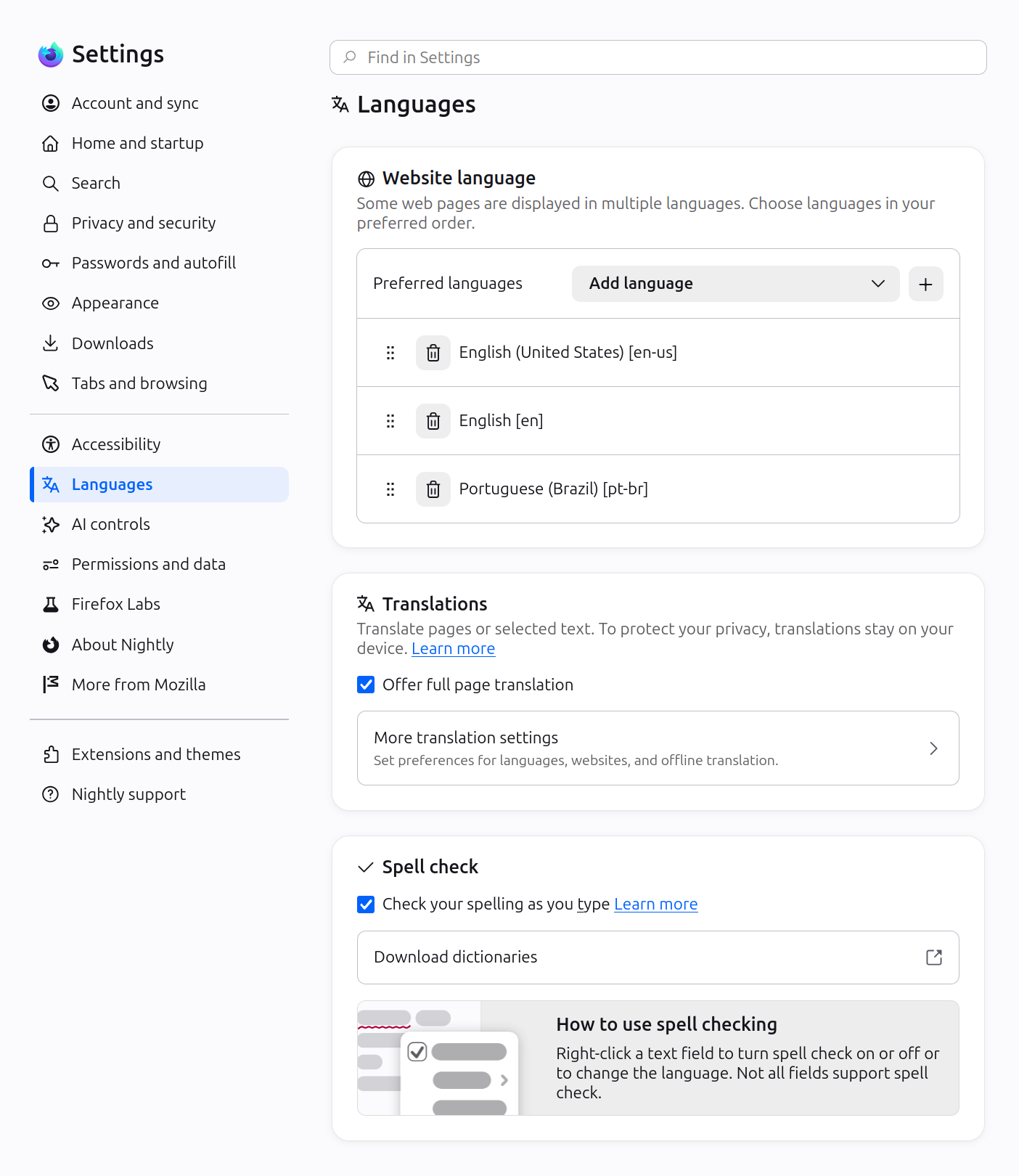
Firefox Settings features a brand-new look with streamlined organization,
clearer groupings, and improved navigation for easier customization.
https://i.meee.com.tw/ynBy5AQ.png
https://bit.ly/4uy1h2t
In Private Browsing windows, you can now temporarily disable tracker
blocking for a tab if it's causing a site to break. When you reload a page
where trackers were blocked, Firefox shows a message offering to reload without
the stricter protections. All other tracking protections stay active.
https://i.meee.com.tw/LpUdOTH.png
You can now mute your browser from the address bar: type "mute" (or "shush"
or "sssh") and use the address bar
quick action to silence every tab
currently playing sound across all Firefox windows.
https://support.mozilla.org/kb/quick-actions-firefox-search-bar
Improved support for more advanced cursor movement commands, including
those relating to paragraph boundaries, on macOS.
On Windows and Linux, you can now copy links via the tab context menu by
right-clicking a tab and selecting Share > Copy Link, making it easy to copy
a link without switching to the tab first. When multiple tabs are selected,
you can copy all selected links at once. Windows users still retain access to
Microsoft sharing options from the Share menu.
A "Send tab" toolbar button is now available which can be added via More
Tools > Customize Toolbar.
The following languages are now available for
Translations:
。Basque
。Galician
https://support.mozilla.org/kb/website-translation
Firefox builds in Croatian, English (UK), Georgian, Persian, Slovenian,
Tajik, Tamil, Tibetan, Turkish, Welsh, and Xhosa now come with a built-in
dictionary for the
Firefox spellchecker.
https://support.mozilla.org/kb/how-do-i-use-firefox-spell-checker
Firefox Labs︰
Firefox now offers experimental support for the new
JPEG XL image format,
which generally provides better compression than WebP, JPEG, PNG, and GIF and
is designed to supersede them. You can enable it from the Firefox Labs panel
in Settings.
https://i.meee.com.tw/Z6W5eLq.png
https://jpegxl.info/
Fixed︰
Fixed an issue where the Paste option could be missing from context menus
when editing content on sites such as Squarespace, LinkedIn, and eBay.
Improved dragging images from Firefox to the desktop or Finder on macOS —
images now save reliably and land where you drop them.
In multiple monitor situations, the About Firefox window now more reliably
opens on the display with the most recently used Firefox window.
Fixed arrow-key text navigation and word selection commands that moved in
the wrong direction in right-to-left text on macOS and Linux.
Various security fixes.
https://www.mozilla.org/security/advisories/mfsa2026-57
Changed︰
Site zooming via keyboard or mouse now offers more zoom levels in smaller
increments than before.
When a PDF or other file that Firefox opens directly finishes downloading,
it now opens in a background tab if you've switched tabs or closed the original
page.
The Tabs from Other Devices panel in the sidebar now lets you open tabs in
a new tab or a new container tab from the context menu.
Developer︰
Developer Information
https://developer.mozilla.org/docs/Mozilla/Firefox/Releases/152
Developer Tools now have an option in the
Settings panel to toggle the
display of comment nodes in the Inspector.
https://mzl.la/4a01dRY
Web Platform︰
Web Notifications can now have
action buttons via the actions option. They
appear as buttons below the notification text or in the Options list on macOS.
The
field-sizing property is now available, allowing form controls to
adjust in size to fit their contents.
https://developer.mozilla.org/docs/Web/CSS/Reference/Properties/field-sizing
Firefox now supports the WebAuthn Related Origin Request feature, which
simplifies login flows by making Passkeys usable from multiple domains.
The Pointer Lock API now supports the
unadjustedMovement option, allowing
sites to receive raw mouse-movement data unaffected by OS-level acceleration.
--
身在黑暗 心向光明
--
※ 發信站: 批踢踢實業坊(ptt.cc), 來自: 61.30.176.125 (臺灣)
※ 文章網址: https://www.ptt.cc/bbs/Browsers/M.1781628159.A.C24.html
推 aiwheat: 最近自動更新到152版後,發現有些網頁內嵌的YT影片,以前 06/18 09:33
→ aiwheat: 可以看得到,現在不行了,只出現這個裝置不支援撥放影片 06/18 09:34
※ 編輯: rick (61.30.178.251 臺灣), 06/18/2026 20:39:06
→ rick: 才兩天就有.0.1 這次會到.0.5嗎? @@ 06/18 20:39
→ DavisX: 又是intel 06/19 10:50
推 z22771187: 我的老電腦firefox這幾版常常整台crash 06/19 16:17
→ z22771187: win10 2021 ltsc+ intel e3-1231v3 06/19 16:17
→ rick: 我的也會 感覺CPU用量增加了 Orz 但2011買到現在 撐到降價 06/20 19:33
→ rick: 分頁群組+分頁太多 砍掉分頁群組(可能有八千多個分頁= =a) 06/21 08:08
→ rick: 開啟速度變快 記憶體的用量也降低 結論:沒用的分頁別囤 Orz 06/21 08:09
→ rick: 我沒用Auto Tab Discard 但是有用LoadTabOnSelect 06/21 08:10
→ rick: 還有Duplicate Tabs Closer 避免開到自己開過的網頁都不知道 06/21 08:11
→ rick: 還剩大概15xx的分頁 感覺太多分頁 記憶體跟cpu還是吃很兇 06/21 08:14
→ rick: 造成firefox會卡頓+遲緩 沒啥用的分頁還是少開or買新電腦 06/21 08:15
推 sporocyst: 沒有批評的意思,但是開這麼多分頁我感覺除了拖後腿外 06/21 14:26
→ sporocyst: ,沒有真正的幫助 06/21 14:26
→ cys070: crash有些是跟輸入法,我用新酷音tsf版碰到 06/21 15:59
推 neoark: 這版在Windows上開始支援HDR影片了!但是HDR圖片還是沒支援 06/21 17:07
→ squrar: 內嵌的YT影片問題 我關掉Enhancer for YouTube套件就好了 06/21 17:27
→ rick: @sporocyst 就沒看的網頁... 留著有空看...所以才能刪那麼多 06/21 19:39
推 sellgd: 你分頁再細分到不同的分頁存檔 或瀏覽器instance就好了 06/22 02:13
→ sellgd: 6樓有開工管看是cpu或記憶體不夠嗎? 覺得你cpu就100%了 06/22 02:14
→ rick: 早上看還沒有 現在看有152.0.2了 晚點更新~ 06/23 19:29
※ 編輯: rick (61.30.180.234 臺灣), 06/23/2026 21:19:10
→ rick: @sellgd 嗯~ 現在安裝正式版跟ESR兩個版本 不過profile複製 06/24 20:59
→ rick: 給ESR用 他提示舊版profile 一定要開個新的設定檔 Orz 06/24 20:59
→ rick: 好像要改 compatibility.ini 裡面的LastVersion 再研究一下 06/24 21:14
→ rick: 我複製過去 改ESR的profiles裡的compatibility.ini裡的版本 06/24 21:48
→ rick: 號 能成功使用了 Orz 不過擴充套件的相容性要再觀察一下 06/24 21:48
推 sellgd: 我直接複製到不同資料夾就可用了 只是工作列上會跑到最後 06/25 10:54
→ sellgd: 開新的把工作列已開圖示隔在其他圖示之間 06/25 10:54
→ sellgd: 純64bit沒成功過 x32/x64版成功 但應該也改過.ini 06/25 10:55
→ sellgd: 捷徑也不必用參數 那是quantum版之前在用的 06/25 10:56
→ rick: 你那是都用正式版 我是用正式版跟ESR 差異在這邊吧 XD 06/25 11:45
推 sellgd: 不是 我都用 portable 06/25 12:39
→ sellgd: 反正就是不知怎麼調整的 在56版之後的量子版 就不需參數了 06/25 12:40
※ 編輯: rick (61.30.176.99 臺灣), 06/26/2026 00:05:09
推 sellgd: FirefoxPortable.ini 檔中的 06/26 00:13
→ sellgd: AllowMultipleInstances=true 會是這個參數嗎? 06/26 00:13
推 YuQilin: FirefoxPortable.exe --allow-downgrade 06/26 15:06
推 sellgd: 以前可多開是 -no -remote 06/26 16:50
→ rick: Y大的那個參數應該是允許降版本號 06/26 17:01
推 sellgd: 我找到以前改瀏覽器的記錄了 06/26 17:15
→ sellgd: \FirefoxPortable\Other\Source\ 裡的FirefoxPortable.ini 06/26 17:15
→ sellgd: 複製到 \FirefoxPortable\FirefoxPortable.exe 資料夾即可 06/26 17:16
→ sellgd: 然後改 37 樓的參數 06/26 17:16
→ sellgd: 但複製資料夾多開 有些版本能成 有些就不能 忘了為什麼? 06/26 17:17
推 sellgd: 152 這版的關閉硬體加速在哪? 設定 的選項都調整位置了 06/27 19:53
推 sellgd: 找到 在 分頁與瀏覽 那 06/27 19:56
推 chiij: 感謝 42 樓 s 大 06/28 04:43
→ rick: 今天有.0.4 06/30 10:37
※ 編輯: rick (61.30.134.221 臺灣), 06/30/2026 21:42:47
→ rick: 不過不會完全列出(相同的太多的話) 大概列9個吧! 07/02 08:24
推 sellgd: 140.04 版 分頁開到特定數量會抖 但再開1個或減1就OK 07/04 16:01
→ sellgd: 152這版 開多會一直抖 再開/減1分頁無減 還是抖 07/04 16:02
→ rick: 今天有.0.5 07/07 12:48
※ 編輯: rick (124.8.32.178 臺灣), 07/07/2026 21:28:10
→ rick: 久違的.0.6 07/14 19:33
※ 編輯: rick (61.30.177.221 臺灣), 07/14/2026 21:17:03
→ bajiqa: 版號沒改 07/14 22:46
※ 編輯: rick (61.30.177.70 臺灣), 07/14/2026 23:00:37
→ rick: 改了~ tks!! 07/14 23:00
→ hijacker: 153出了 07/21 21:23
推 sellgd: 143 不會開多頁抖動 145 會,再試試144看看 08/05 00:39
推 sellgd: 144不會 08/05 00:59